
Understanding How BLE Stack uses NVS on Zephyr
January 1, 2026
I’ve been working with Non-Volatile Storage (NVS) in Zephyr to handle logging and Bluetooth bonding information. NVS works like a simple key-value database: data is stored as an id-data pair, and Zephyr provides APIs (and even an example project) to interact with it.
In this post, I’m focusing on how the BLE stack uses NVS to store bonding data.
For reference, I’m testing on an nRF52840, but the same principles apply to other MCUs as long as you’re using Zephyr, MCUBoot, and NVS.
Basic Concepts
Non-Volatile Flash Memory
To enable NVS in Zephyr, you first need this config in your prj.conf:
CONFIG_NVS=y # Needed for Bluetooth storage (Non-volatile storage)
Flash memory behaves differently from RAM and comes with a few important limitations:
- A freshly erased flash page is filled with 0xFF.
- Each page has a limited number of erase cycles (endurance). For example, on the nRF51822, each flash page is 1024 bytes and can only be erased about 20,000 times.
- You can’t overwrite data arbitrarily. To write new data, the page must be erased first.
NOR flash (and many other non-volatile memories like NAND, EEPROM, EPROM) default to logic 1. Programming can only flip bits from 1 → 0. If you want to change 0x0123 to 0x3210, you can’t just overwrite it like RAM — you must erase the page and rewrite it.
If you’re curious about why non-volatile memory defaults to 1s, this StackExchange thread is a good explainer
NVS in Zephry
Zephyr organizes flash into sectors, and each sector stores multiple records. To reduce flash wear, NVS uses its own algorithm to minimize wear out of flash memory, which is not part of this post scope.
A sector is a bunch of flash memory pages, which are the fundamental data that can be written to a NAND memory.
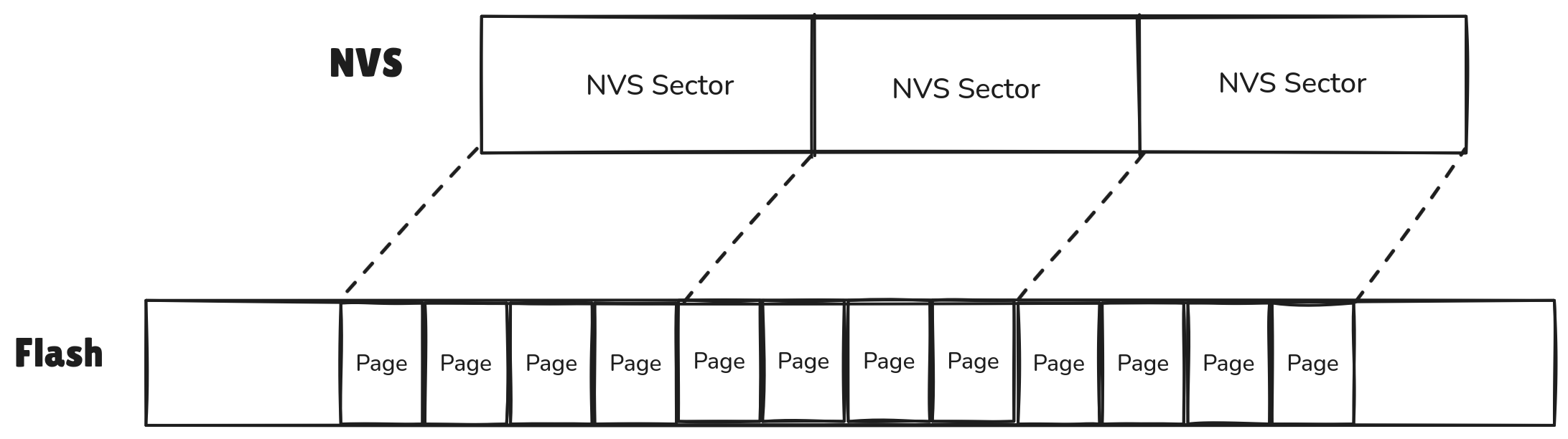
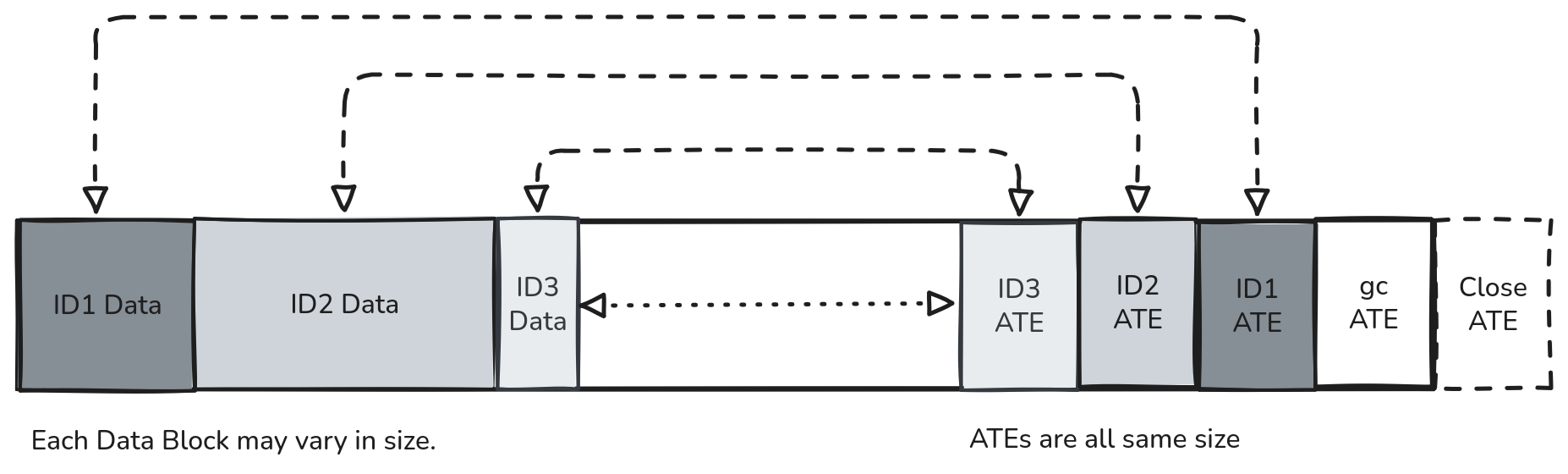
When writing data, NVS separates the data itself from the Allocation Table Entry (ATE):
- Data grows forward from the beginning of the sector.
- ATEs grow backward from the end of the sector.
This layout makes it easy to track what’s stored without constantly rewriting entire pages.
Allocation Table Entry (ATE)
Each record in NVS has a corresponding ATE, which contains metadata about the data entry:
/* zephyr/subsys/fs/nvs/nvs_priv.h */
struct nvs_ate {
	uint16_t id;	/* data id */
	uint16_t offset;	/* data offset within sector */
	uint16_t len;	/* data len within sector */
	uint8_t part;	/* part of a multipart data - future extension */
	uint8_t crc8;	/* crc8 check of the entry */
} __packed;
There are two special ATE types:
- Close ATE
- Marks a sector as “closed.”
- id = 0xFFFF, len = 0.
- Written at the very end of a sector when NVS moves on to the next one.
- GC ATE (Garbage Collector)
Here’s the code snippet for writing a Close ATE in Zephyr’s nvs.c:
/* zephyr/subsys/fs/nvs/nvs.c */
close_ate.id = 0xFFFF;
close_ate.len = 0U;
close_ate.offset = (uint16_t)((fs->ate_wra + ate_size) & ADDR_OFFS_MASK);
close_ate.part = 0xff;
NVS with BLE on Zephyr
To make Zephyr store Bluetooth bonding info in flash, you just need one config:
CONFIG_BT_SETTINGS=y # BLE will take care of storing (and restoring) the Bluetooth state (e.g. pairing keys) and configuration persistently in flash
You can also check out Zephyr’s Direct Advertising sample, which already uses this:
west build -b nrf52840dk/nrf52840 --pristine --sysbuild -d nvs_ble_build zephry/samples/bluetooth/direct_adv
west flash -d nvs_ble_build
Reading NVS Content
If you’re using MCUBoot, the flash layout is divided into partitions. The one that matters for us is storage_partition
&flash0 {
	partitions {
		...
		storage_partition: partition@f8000 {
			label = "storage";
			reg = <0x000f8000 0x00008000>;
		};
	};
};
To peek at what’s inside storage_partition, I used nrfutil to dump it:
Usage: nrfutil device read [OPTIONS] --address <ADDRESS>                                                                                    Options:
      --address <ADDRESS>
          Start address
      --bytes <BYTES>
          Number of bytes to read
          Defaults to one word of the given word width if not specified.

nrfutil device read --address 0x000f8000 --bytes 0x00008000 > storage_partition
When you first dump it, most of the data will be filled with 0xFF (erased flash). For example:
0x000F8000: FFFFFFFF FFFFFFFF FFFFFFFF FFFFFFFF   |................|
0x000F8010: FFFFFFFF FFFFFFFF FFFFFFFF FFFFFFFF   |................|
0x000F8020: FFFFFFFF FFFFFFFF FFFFFFFF FFFFFFFF   |................|
To make things easier, I filtered out the all-FF lines so only actual NVS records remain:
0x000FE000: FFFF8001 CE3988EC 7FCA6A41 C7972C03   |......9.Aj...,..|
0x000FE010: 027543B6 682F7462 FF687361 FFFFFFFF   |.Cu.bt/hash.....|
0x000FEFD0: FFFFFFFF FFFFFFFF 00148001 2FFF0007   |.............../|
0x000FEFE0: 0004C001 DFFF0010 00008000 8DFF0002   |................|
0x000FEFF0: 0000FFFF 5CFF0000 FFFFFFFF FFFFFFFF   |.......\........|
What do these bytes actually mean??
What BLE Stack Writes on NVS
From the NVS dump, we can separate data records and ATEs. For the pre-bonding phase, it looks like this:
## Here starts the Data
0x000FE000: FFFF8001 CE3988EC 7FCA6A41 C7972C03   |......9.Aj...,..|
0x000FE010: 027543B6 682F7462 FF687361 FFFFFFFF   |.Cu.bt/hash.....|

### Here starts the ATEs
0x000FEFD0: FFFFFFFF FFFFFFFF 00148001 2FFF0007   |.............../|
0x000FEFE0: 0004C001 DFFF0010 00008000 8DFF0002   |................|
0x000FEFF0: 0000FFFF 5CFF0000 FFFFFFFF FFFFFFFF   |.......\........|
Remember the ATE structure?
/* zephyr/subsys/fs/nvs/nvs_priv.h */
struct nvs_ate {
	uint16_t id;	/* data id */
	uint16_t offset;	/* data offset within sector */
	uint16_t len;	/* data len within sector */
	uint8_t part;	/* part of a multipart data - future extension */
	uint8_t crc8;	/* crc8 check of the entry */
} __packed;
Since each ATE is 8 bytes, we can see that the flash starting at 0x000FEFD8 contains four ATEs, ending at 0x000FEFF0.

At first, I thought Zephyr would write only one flash block when saving BLE settings. Turns out, more bytes are written at the end of the sector than expected
so … what’s going on?
Storage Partition Analysis
The easiest way to analyze this problem was to enable more debug information from NVS and add some logging in nvs.c.
So, I enabled the NVS logging and increased the logging buffer so I don’t miss any logs!
CONFIG_NVS_LOG_LEVEL_DBG=y
CONFIG_LOG_BUFFER_SIZE=2048
I also added logging in:
nvs_flash_al_wrt()→ writes aligned data to flashnvs_flash_wrt_entry()→ writes a data entry corresponding to a specific ATE
This helped me distinguish special ATEs (GC/Close) from normal ID-data pairs.
The logs are huge, so after some cleaning, I ended up with the following:
fs_nvs: nvs_recover_last_ate: Recovering last ate from sector 0
fs_nvs: nvs_add_gc_done_ate: Adding gc done ate at ff0

## Writting GC done ATE
## GC_done ATE is written to indicate that the next sector has already been garbage-collected. This ATE could be at any position of the sector.
fs_nvs: nvs_flash_al_wrt: ========================================
fs_nvs: nvs_flash_al_wrt: Writing aligned data:
	 ff ff 00 00 00 00 ff 5c                          |.......\
fs_nvs: nvs_flash_al_wrt: Writing aligned data at offset 0x000feff0
fs_nvs: 2 Sectors of 4096 bytes
fs_nvs: alloc wra: 0, fe8
fs_nvs: data wra: 0, 0

## First ID-Data pair
fs_nvs: nvs_flash_wrt_entry: Writting a WRT entry
fs_nvs: nvs_flash_al_wrt: ========================================
fs_nvs: nvs_flash_al_wrt: Writing padded data:
	 01 80 ff ff                                      |....
fs_nvs: nvs_flash_al_wrt: Writing padded data at offset 0x000fe000
fs_nvs: nvs_flash_al_wrt: ========================================
fs_nvs: nvs_flash_al_wrt: Writing aligned data:
	 00 80 00 00 02 00 ff 8d                          |........
fs_nvs: nvs_flash_al_wrt: Writing aligned data at offset 0x000fefe8

## Second ID-Data pair
fs_nvs: nvs_flash_wrt_entry: Writting a WRT entry
fs_nvs: nvs_flash_al_wrt: ========================================
fs_nvs: nvs_flash_al_wrt: Writing aligned data:
	 71 a2 01 f9 12 bc 44 de  fd f9 b0 57 d3 45 0b 4e |q.....D. ...W.E.N
fs_nvs: nvs_flash_al_wrt: Writing aligned data at offset 0x000fe004
fs_nvs: nvs_flash_al_wrt: ========================================
fs_nvs: nvs_flash_al_wrt: Writing aligned data:
	 01 c0 04 00 10 00 ff df                          |........
fs_nvs: nvs_flash_al_wrt: Writing aligned data at offset 0x000fefe0

## Third ID-Data pair
fs_nvs: nvs_flash_wrt_entry: Writting a WRT entry
fs_nvs: nvs_flash_al_wrt: ========================================
fs_nvs: nvs_flash_al_wrt: Writing aligned data:
	 62 74 2f 68                                      |bt/h
fs_nvs: nvs_flash_al_wrt: Writing aligned data at offset 0x000fe014
fs_nvs: nvs_flash_al_wrt: Writing padded data:
	 61 73 68 ff                                      |ash.
fs_nvs: nvs_flash_al_wrt: Writing padded data at offset 0x000fe018
fs_nvs: nvs_flash_al_wrt: ========================================
fs_nvs: nvs_flash_al_wrt: Writing aligned data:
	 01 80 14 00 07 00 ff 2f                          |......./
fs_nvs: nvs_flash_al_wrt: Writing aligned data at offset 0x000fefd8
From the logs, we can see four ATEs were written but only three data packets.
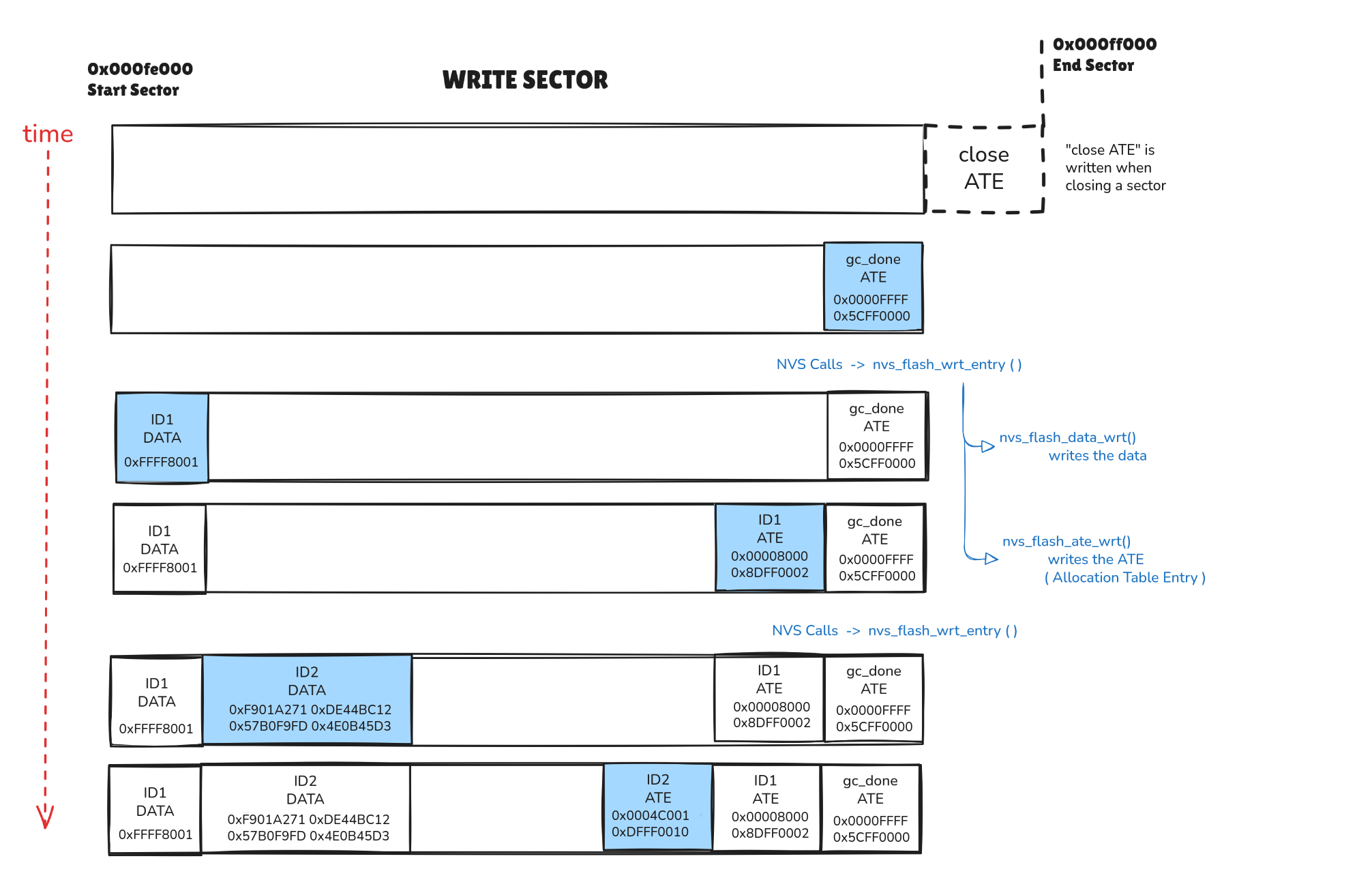
ATEs are clear, but what data was written?
Diving into BLE Code
Let’s dive into the code to understand what BLE in Flash writes.
0x000FE000: FFFF8001 CE3988EC 7FCA6A41 C7972C03   |......9.Aj...,..|
0x000FE010: 027543B6 682F7462 FF687361 FFFFFFFF   |.Cu.bt/hash.....|
At first glance, I noticed the bt/hash. And, since the previous analysis, you can see that bt/hash was one data packet!
fs_nvs: nvs_flash_al_wrt: Writing aligned data:
	 62 74 2f 68                                      |bt/h
fs_nvs: nvs_flash_al_wrt: Writing aligned data at offset 0x000fe014
fs_nvs: nvs_flash_al_wrt: Writing padded data:
	 61 73 68 ff                                      |ash.
fs_nvs: nvs_flash_al_wrt: Writing padded data at offset 0x000fe018
So I could trace it back to three functions in subsys/bluetooth/host/settings.c which was expected since I added CONFIG_BT_SETTINGS=y to my prj.conf. This is to enable storing settings into flash.
bt_settings_store_hash: Addhashstring to data packetbt_settings_store: calls an encoding functionbt_settings_encode_key: addbt/string to data packet
/* zephyr/subsys/bluetooth/host/settings.c */
int bt_settings_store_hash(const void *value, size_t val_len)
{
	return bt_settings_store("hash", 0, NULL, value, val_len);
}

/* bt/hash from flash comes from  bt_settings_store +  bt_settings_encode_key */
int bt_settings_store(const char *key, uint8_t id, const bt_addr_le_t *addr, const void *value,
		      size_t val_len)
{
	...
		bt_settings_encode_key(key_str, sizeof(key_str), key, addr, (id ? id_str : NULL));
	...
}

void bt_settings_encode_key(char *path, size_t path_size, const char *subsys, ..)
{
	...
	if (len < path_size) {
		/* Key format:
		 *  "bt/<subsys>/<addr><type>/<key>", "/<key>" is optional
		 */
		strcpy(path, "bt/");
		strncpy(&path[len], subsys, path_size - len);
		len = strlen(path);
		if (len < path_size) {
			path[len] = '/';
			len++;
		}
		...
	}
	...
}
So this identifies data packet ID 3.
The next question is.. who calls bt_settings_store_hash?
That was an easy one. I used my modified version of grep to search for that function in Zephyr’s codebase.
dgrep 'bt_settings_store_hash'
1       subsys/bluetooth/host/settings.h:53:int bt_settings_store_hash(const void *value, size_t val_len);
2       subsys/bluetooth/host/settings.c:398:int bt_settings_store_hash(const void *value, size_t val_len)
3       subsys/bluetooth/host/gatt.c:871:       err = bt_settings_store_hash(&db_hash.hash, sizeof(db_hash.hash));
The only option is gatt.c and the calling function is db_hash_store().
static void db_hash_store(void)
{
	int err;
	err = bt_settings_store_hash(&db_hash.hash, sizeof(db_hash.hash));
	if (err) {
		LOG_ERR("Failed to save Database Hash (err %d)", err);
	}
	LOG_DBG("Database Hash stored");
}
and since it’s defined as static, it means it can be only called within gatt.c. In this case, there are two calls to db_hash_store
static ssize_t db_hash_read(...)
static void do_db_hash(...)
After checking the code this snippet called my attention
static int db_hash_commit(void)
{
	atomic_set_bit(gatt_sc.flags, DB_HASH_LOAD);

	/* Calculate the hash and compare it against the value loaded from
	 * flash. Do it from the current context to avoid any potential race
	 * conditions.
	 */
	do_db_hash();

	return 0;
}
That comment explains what do_db_hash does. It means that one of the other two data packets is a hash value based on GATT Service Change Flags. The Service Change is a characteristic that signals that the GATT database changed. So, it’s safe to assume that one data packet in NVS is a hash value related to the GATT database, probably to verify if it changed.
To know exactly which data packet this hash is, let’s check the definition of db_hash.hash, since it’s used in db_hash_store().
#if defined(CONFIG_BT_GATT_CACHING)
static struct db_hash {
	uint8_t hash[16];
#if defined(CONFIG_BT_SETTINGS)
	 uint8_t stored_hash[16];
#endif
	struct k_work_delayable work;
	struct k_work_sync sync;
} db_hash;
#endif
It’s clear that hash has 16 bytes, so it must be data packet with ID 2.
fs_nvs: nvs_flash_al_wrt: Writing aligned data:
	 71 a2 01 f9 12 bc 44 de  fd f9 b0 57 d3 45 0b 4e |q.....D. ...W.E.N
fs_nvs: nvs_flash_al_wrt: Writing aligned data at offset 0x000fe004
We have 2 or 3, more or less. because we didn't exactly identified which data packet is the hash.
That leave us with data packet with ID 1
fs_nvs: nvs_flash_al_wrt: Writing padded data:
	 01 80 ff ff                                      |....
fs_nvs: nvs_flash_al_wrt: Writing padded data at offset 0x000fe000
These four bytes tell me almost nothing. So I started a bonding to get extra information
[00:00:00.021,820] <inf> app: NFC configuration done
[00:52:24.337,799] <dbg> app: advertising_continue: Regular advertising started
[00:52:26.566,436] <dbg> app: connected: Connection connected, count: 1
[00:52:26.566,497] <dbg> app: connected: Connected 71:AB:41:E4:20:54 (random)
[00:52:26.969,146] <dbg> app: auth_oob_data_request: LESC OOB data requested
[00:52:27.239,318] <dbg> app: security_changed: Security changed: 71:AB:41:E4:20:54 (random) level 4

## ID-Data 4
[00:52:27.301,391] <dbg> fs_nvs: nvs_flash_wrt_entry: Writting a WRT entry
[00:52:27.301,422] <dbg> fs_nvs: nvs_flash_al_wrt: ========================================
[00:52:27.301,452] <dbg> fs_nvs: nvs_flash_al_wrt: Writing padded data:
                                 02 80 ff ff                                      |....
[00:52:27.301,452] <dbg> fs_nvs: nvs_flash_al_wrt: Writing padded data at offset 0x000fe01c
[00:52:27.301,971] <dbg> fs_nvs: nvs_flash_al_wrt: ========================================
[00:52:27.302,001] <dbg> fs_nvs: nvs_flash_al_wrt: Writing aligned data:
                                 00 80 1c 00 02 00 ff 29                          |.......)
[00:52:27.302,062] <dbg> fs_nvs: nvs_flash_al_wrt: Writing aligned data at offset 0x000fefd0

## ID-Data 5
[00:52:27.302,673] <dbg> fs_nvs: nvs_flash_wrt_entry: Writting a WRT entry
[00:52:27.302,703] <dbg> fs_nvs: nvs_flash_al_wrt: ========================================
[00:52:27.302,734] <dbg> fs_nvs: nvs_flash_al_wrt: Writing aligned data:
                                 10 33 3a 00 00 00 00 00  00 00 00 00 00 00 f2 97 |.3:..... ........
                                 a8 c7 1c 7d fd e0 df 86  5c 77 33 ae de b1 05 ff |...}.... \w3.....
                                 dd 0b 53 4c e5 ad 4d 61  53 f9 82 ed 2a 5c 54 20 |..SL..Ma S...*\T
                                 e4 41 ab 71 77 1c 2d d0  6c be 10 72 01 cf a4 b6 |.A.qw.-. l..r....
                                 0f b9 4f a6 00 00 00 00  64 39 69 b6 2e bf b4 34 |..O..... d9i....4
                                 66 12 ac 8c fc dd 4a df  00 00 00 00 00 00 00 00 |f.....J. ........
                                 00 00 00 00 00 00 00 00  00 00 00 00 00 00 00 00 |........ ........
                                 00 00 00 00 00 00 00 00  02 00 00 00             |........ ....
[00:52:27.302,764] <dbg> fs_nvs: nvs_flash_al_wrt: Writing aligned data at offset 0x000fe020
[00:52:27.304,687] <dbg> fs_nvs: nvs_flash_al_wrt: ========================================
[00:52:27.304,718] <dbg> fs_nvs: nvs_flash_al_wrt: Writing aligned data:
                                 02 c0 20 00 7c 00 ff 6d                          |.. .|..m
[00:52:27.304,718] <dbg> fs_nvs: nvs_flash_al_wrt: Writing aligned data at offset 0x000fefc8

## ID-Data 6
[00:52:27.305,328] <dbg> fs_nvs: nvs_flash_wrt_entry: Writting a WRT entry
[00:52:27.305,358] <dbg> fs_nvs: nvs_flash_al_wrt: ========================================
[00:52:27.305,389] <dbg> fs_nvs: nvs_flash_al_wrt: Writing aligned data:
                                 62 74 2f 6b 65 79 73 2f  34 30 66 61 66 65 39 34 |bt/keys/ 40fafe94
                                 66 38 31 62                                      |f81b
[00:52:27.305,419] <dbg> fs_nvs: nvs_flash_al_wrt: Writing aligned data at offset 0x000fe09c
[00:52:27.306,152] <dbg> fs_nvs: nvs_flash_al_wrt: Writing padded data:
                                 30 ff ff ff                                      |0...
[00:52:27.306,152] <dbg> fs_nvs: nvs_flash_al_wrt: Writing padded data at offset 0x000fe0b0
[00:52:27.306,671] <dbg> fs_nvs: nvs_flash_al_wrt: ========================================
[00:52:27.306,701] <dbg> fs_nvs: nvs_flash_al_wrt: Writing aligned data:
                                 02 80 9c 00 15 00 ff b3                          |........
[00:52:27.306,732] <dbg> fs_nvs: nvs_flash_al_wrt: Writing aligned data at offset 0x000fefc0

## ID-Data 7
[00:52:27.307,373] <dbg> app: pairing_complete: Pairing completed: 40:FA:FE:94:F8:1B (public), bonded: 1
[00:52:27.307,800] <dbg> app: paring_key_generate: Generating new pairing keys
[00:52:28.189,147] <dbg> fs_nvs: nvs_flash_wrt_entry: Writting a WRT entry
[00:52:28.189,208] <dbg> fs_nvs: nvs_flash_al_wrt: ========================================
[00:52:28.189,239] <dbg> fs_nvs: nvs_flash_al_wrt: Writing padded data:
                                 03 80 ff ff                                      |....
[00:52:28.189,239] <dbg> fs_nvs: nvs_flash_al_wrt: Writing padded data at offset 0x000fe0b4
[00:52:28.189,758] <dbg> fs_nvs: nvs_flash_al_wrt: ========================================
[00:52:28.189,788] <dbg> fs_nvs: nvs_flash_al_wrt: Writing aligned data:
                                 00 80 b4 00 02 00 ff c3                          |........
[00:52:28.189,819] <dbg> fs_nvs: nvs_flash_al_wrt: Writing aligned data at offset 0x000fefb8

## ID-Data 8
[00:52:28.190,429] <dbg> fs_nvs: nvs_flash_wrt_entry: Writting a WRT entry
[00:52:28.190,460] <dbg> fs_nvs: nvs_flash_al_wrt: ========================================
[00:52:28.190,490] <dbg> fs_nvs: nvs_flash_al_wrt: Writing aligned data:
                                 00 00 00 00                                      |....
[00:52:28.190,551] <dbg> fs_nvs: nvs_flash_al_wrt: Writing aligned data at offset 0x000fe0b8
[00:52:28.191,070] <dbg> fs_nvs: nvs_flash_al_wrt: ========================================
[00:52:28.191,101] <dbg> fs_nvs: nvs_flash_al_wrt: Writing aligned data:
                                 03 c0 b8 00 04 00 ff 38                          |.......8
[00:52:28.191,131] <dbg> fs_nvs: nvs_flash_al_wrt: Writing aligned data at offset 0x000fefb0

## ID-Data 9
[00:52:28.191,772] <dbg> fs_nvs: nvs_flash_wrt_entry: Writting a WRT entry
[00:52:28.191,772] <dbg> fs_nvs: nvs_flash_al_wrt: ========================================
[00:52:28.191,802] <dbg> fs_nvs: nvs_flash_al_wrt: Writing aligned data:
                                 62 74 2f 73 63 2f 34 30  66 61 66 65 39 34 66 38 |bt/sc/40 fafe94f8
[00:52:28.191,833] <dbg> fs_nvs: nvs_flash_al_wrt: Writing aligned data at offset 0x000fe0bc
[00:52:28.192,504] <dbg> fs_nvs: nvs_flash_al_wrt: Writing padded data:
                                 31 62 30 ff                                      |1b0.
[00:52:28.192,535] <dbg> fs_nvs: nvs_flash_al_wrt: Writing padded data at offset 0x000fe0cc
[00:52:28.193,054] <dbg> fs_nvs: nvs_flash_al_wrt: ========================================
[00:52:28.193,084] <dbg> fs_nvs: nvs_flash_al_wrt: Writing aligned data:
                                 03 80 bc 00 13 00 ff 75                          |.......u
[00:52:28.193,115] <dbg> fs_nvs: nvs_flash_al_wrt: Writing aligned data at offset 0x000fefa8

## ID-Data 10
[00:52:29.194,061] <dbg> fs_nvs: nvs_flash_wrt_entry: Writting a WRT entry
[00:52:29.194,091] <dbg> fs_nvs: nvs_flash_al_wrt: ========================================
[00:52:29.194,152] <dbg> fs_nvs: nvs_flash_al_wrt: Writing padded data:
                                 04 80 ff ff                                      |....
[00:52:29.194,152] <dbg> fs_nvs: nvs_flash_al_wrt: Writing padded data at offset 0x000fe0d0
[00:52:29.194,671] <dbg> fs_nvs: nvs_flash_al_wrt: ========================================
[00:52:29.194,702] <dbg> fs_nvs: nvs_flash_al_wrt: Writing aligned data:
                                 00 80 d0 00 02 00 ff e0                          |........
[00:52:29.194,732] <dbg> fs_nvs: nvs_flash_al_wrt: Writing aligned data at offset 0x000fefa0

## ID-Data 11
[00:52:29.195,373] <dbg> fs_nvs: nvs_flash_wrt_entry: Writting a WRT entry
[00:52:29.195,404] <dbg> fs_nvs: nvs_flash_al_wrt: ========================================
[00:52:29.195,434] <dbg> fs_nvs: nvs_flash_al_wrt: Writing aligned data:
                                 04 00 02 00                                      |....
[00:52:29.195,465] <dbg> fs_nvs: nvs_flash_al_wrt: Writing aligned data at offset 0x000fe0d4
[00:52:29.195,983] <dbg> fs_nvs: nvs_flash_al_wrt: ========================================
[00:52:29.196,014] <dbg> fs_nvs: nvs_flash_al_wrt: Writing aligned data:
                                 04 c0 d4 00 04 00 ff 11                          |........
[00:52:29.196,044] <dbg> fs_nvs: nvs_flash_al_wrt: Writing aligned data at offset 0x000fef98

## ID-Data 12
[00:52:29.196,685] <dbg> fs_nvs: nvs_flash_wrt_entry: Writting a WRT entry
[00:52:29.196,716] <dbg> fs_nvs: nvs_flash_al_wrt: ========================================
[00:52:29.196,746] <dbg> fs_nvs: nvs_flash_al_wrt: Writing aligned data:
                                 62 74 2f 63 63 63 2f 34  30 66 61 66 65 39 34 66 |bt/ccc/4 0fafe94f
                                 38 31 62 30                                      |81b0
[00:52:29.196,777] <dbg> fs_nvs: nvs_flash_al_wrt: Writing aligned data at offset 0x000fe0d8
[00:52:29.197,479] <dbg> fs_nvs: nvs_flash_al_wrt: ========================================
[00:52:29.197,509] <dbg> fs_nvs: nvs_flash_al_wrt: Writing aligned data:
                                 04 80 d8 00 14 00 ff 53                          |.......S
[00:52:29.197,540] <dbg> fs_nvs: nvs_flash_al_wrt: Writing aligned data at offset 0x000fef90
I noticed something with ID-data 4, 7 and 10
ID1: 0x8001
ID4: 0x8002
ID7: 0x8003
ID10: 0x8004
That’s a pattern…So, I use grep again!
dgrep "#define.*0x8000$"
1       tests/bluetooth/controller/common/include/helper_features.h:103:#define FEAT_PWR_CLASS1 0x8000
2       subsys/net/lib/dhcpv4/dhcpv4_internal.h:43:#define DHCPV4_MSG_BROADCAST 0x8000
3       subsys/settings/include/settings/settings_nvs.h:33:#define NVS_NAMECNT_ID 0x8000
4       subsys/logging/frontends/log_frontend_stmesp_demux.c:23:#define CONFIG_LOG_FRONTEND_STMESP_TURBO_LOG_BASE 0x8000
5       drivers/pcie/controller/pcie_brcmstb.c:106:#define PCIE_EXT_CFG_DATA  0x8000
...
Of all the matches, settings_nvs.h was the most interesting, since I’m using NVS.
/* In the NVS backend, each setting is stored in two NVS entries:
 *	1. setting's name
 *	2. setting's value
 *
 * The NVS entry ID for the setting's value is determined implicitly based on
 * the ID of the NVS entry for the setting's name, once that is found. The
 * difference between name and value ID is constant and equal to
 * NVS_NAME_ID_OFFSET.
 *
 * Setting's name entries start from NVS_NAMECNT_ID + 1. The entry at
 * NVS_NAMECNT_ID is used to store the largest name ID in use.
 *
 * Deleted records will not be found, only the last record will be
 * read.
 */
#define NVS_NAMECNT_ID 0x8000
From the comments, it’s clear that data packet with ID 1 is an entry count.
To summarize all packets
### Before bonding
ID1: ENTRY_COUNT = NVS_NAMECNT_ID(0x8000) + 1
ID2: Generated Hash for BLE settings
ID3: Key word: bt/hash

## Bonding
ID4: ENTRY count = 0x8002
ID5: encrypted keys or other encrypted information
ID6: key word: bt/keys/addr_paired_host
			   bt/keys/40fafe94f81b
[00:52:27.307,373] <dbg> app: pairing_complete: Pairing completed: 40:FA:FE:94:F8:1B (public), bonded: 1

ID7: Entry count = 0x8003
ID8: secure connection info
ID9: key word: bt/sc/addr_paired_host
			   bt/sc/40fafe94f81b

ID10: Entry count = 0x8004
ID11: key word: bt/ccc/addr_paired_host (ccc = client characteristic configuration)
Conclusions
This was a great exercise that helped me understand:
- How NVS works in Zephyr
- What BLE stack stores in NVS
- Potential vulnerabilities: the data stored in NVS is fairly readable, so an attacker could access sensitive information if they have physical access
I hope you enjoyed this post!
References